Set up sales tax agencies
Add the agencies that you file sales tax returns with, and choose the account and the taxes of each one.
An agency is the government office that you file sales tax returns with, such as the California Department of Tax and Fee Administration. Add each agency that you collect sales tax for. LazyBooks keeps how you file with it, the account for what you owe it, and the taxes that you pay to it.
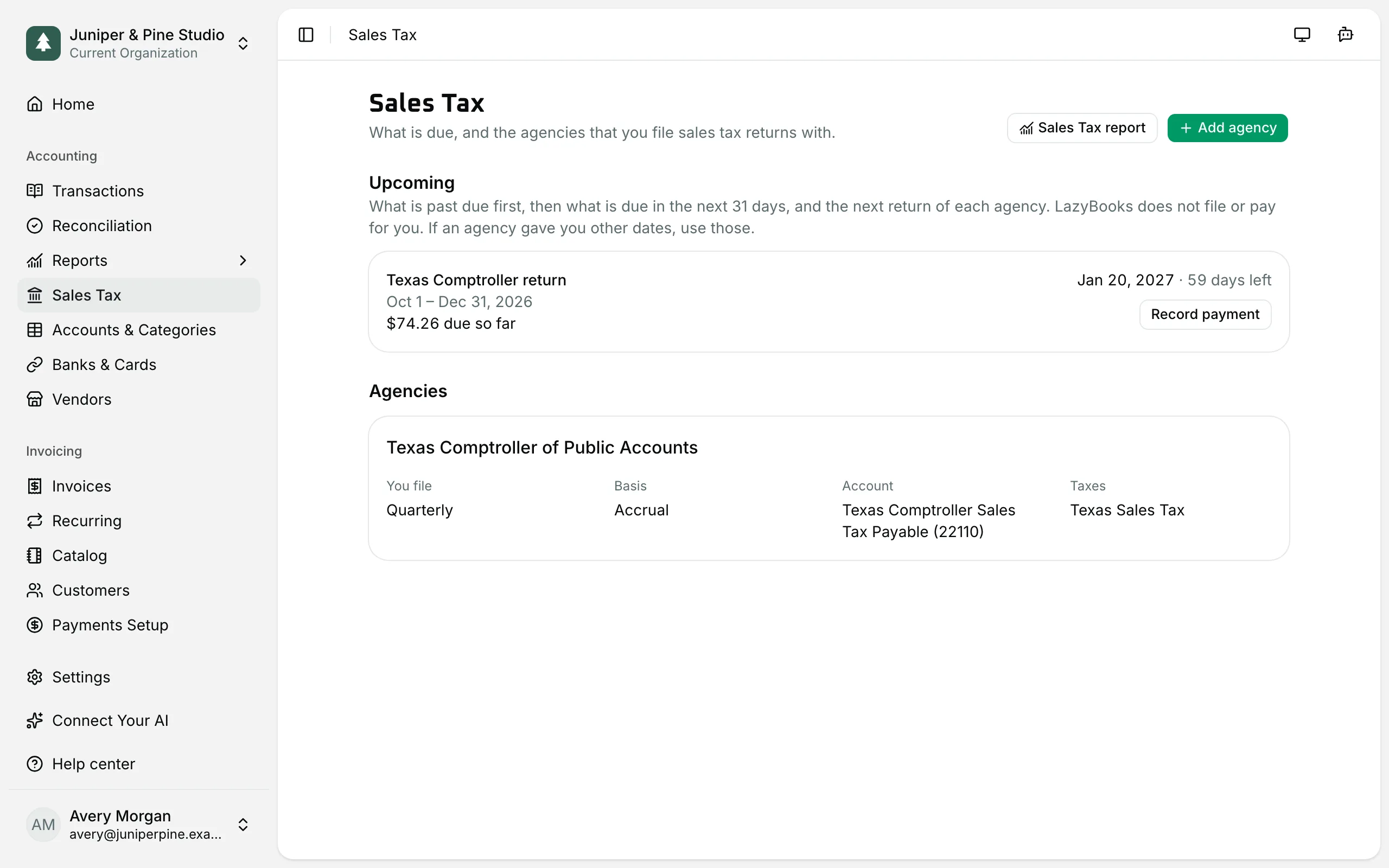
Open your agencies
In the sidebar, under Accounting, click Sales Tax. The page lists what is due, and each agency with how often you file, the basis, the account, and the taxes. An agency that you deactivated shows Inactive. For the due dates and the reminders, see File and track sales tax returns. To record what you paid, see Record a sales tax payment. For Tax to check, see Move sales tax into agency accounts.
Under Taxes with no agency, the page names the active taxes that belong to no agency. Click Go to Taxes to choose an agency for them.
Under Sales tax accounts in your books, the page offers accounts that can be the account of an agency. See Sales tax agencies after an import.
Add an agency
- On the Sales Tax page, click Add agency.
- In Which agency do you file with?, search for your state and choose it. For a different agency, such as a city or an agency in another country, choose Another agency. See Built-in agencies.
- For another agency, type its Agency name. Choose the Kind of agency, the Country, and the State.
- Type your Permit or account number (optional).
- Choose How often you file: Monthly, Quarterly, or Annually. For a built-in agency, the list has only what LazyBooks knows that the agency offers.
- For another agency, choose the day in Returns are due on, such as The 20th of the month after the period.
- If the agency wants part of the tax before each return, select The agency asks me for prepayments. In Texas, prepayments are your choice, so the box is I make prepayments (optional). The box shows only for California and Texas, at a frequency with prepayments, and for another agency.
- Enter the First day you collected tax for this agency.
- If you stopped collecting tax for the agency, enter the Last day (optional). Your final return ends on that day.
- In Last return you already filed, choose a return, or None yet.
- Choose Accrual or Cash. See Choose cash or accrual.
- Choose the Sales Tax Payable account. See Choose the account.
- Click Add agency.
Utah no longer lists annual returns in its publication. You can still choose Annually for Utah if the state has you on annual returns.
Two active agencies cannot have the same name. Two active state agencies cannot have the same days for the same state.
Built-in agencies
LazyBooks has the agency of each state with a statewide sales tax, and of the District of Columbia. Alaska, Delaware, Montana, New Hampshire, and Oregon have no statewide sales tax.
A return is due in the month after its period, on the day in the table, unless the table names a month. The agency decides how often you file. The discount is what LazyBooks suggests when you file and pay on time. A dash means that LazyBooks suggests nothing. If the agency gives you a discount, type it when you record the payment.
| State | Agency | How often you file | When a return is due | Discount |
|---|---|---|---|---|
| Alabama | Alabama Department of Revenue | Monthly, quarterly, or annually | The 20th | — |
| Arizona | Arizona Department of Revenue | Monthly, quarterly, or annually | The 20th | — |
| Arkansas | Arkansas Department of Finance and Administration | Monthly, quarterly, or annually | The 20th | — |
| California | California Department of Tax and Fee Administration | Monthly, quarterly, or annually | The last day | None found |
| Colorado | Colorado Department of Revenue | Monthly, quarterly, or annually | The 20th | — |
| Connecticut | Connecticut Department of Revenue Services | Monthly, quarterly, or annually | The last day | — |
| District of Columbia | DC Office of Tax and Revenue | Monthly, quarterly, or annually | The 20th. The year ends in September, so an annual return is due on October 20 | — |
| Florida | Florida Department of Revenue | Monthly, quarterly, or annually | The 20th | 2.5%, up to $30 a return |
| Georgia | Georgia Department of Revenue | Monthly, quarterly, or annually | The 20th | — |
| Hawaii | Hawaii Department of Taxation | Monthly or quarterly | The 20th | — |
| Idaho | Idaho State Tax Commission | Monthly, quarterly, or annually | The 20th | — |
| Illinois | Illinois Department of Revenue | Monthly, quarterly, or annually | The 20th | 1.75%, up to $1,000 for each month |
| Indiana | Indiana Department of Revenue | Monthly or annually | Monthly: the 30th, or March 1 or 2 for January. Annual: January 31 | — |
| Iowa | Iowa Department of Revenue | Monthly or annually | The last day | — |
| Kansas | Kansas Department of Revenue | Monthly, quarterly, or annually | The 25th | — |
| Kentucky | Kentucky Department of Revenue | Monthly, quarterly, or annually | The 20th | — |
| Louisiana | Louisiana Department of Revenue | Monthly or quarterly | The 20th | 0.84%, up to $750 for each month |
| Maine | Maine Revenue Services | Monthly, quarterly, or annually | The 15th | — |
| Maryland | Comptroller of Maryland | Monthly, quarterly, or annually | The 20th | — |
| Massachusetts | Massachusetts Department of Revenue | Monthly, quarterly, or annually | The 30th, or March 1 or 2 for January | — |
| Michigan | Michigan Department of Treasury | Monthly, quarterly, or annually | The 20th. Annual: February 28 | — |
| Minnesota | Minnesota Department of Revenue | Monthly, quarterly, or annually | The 20th. Annual: February 5 | — |
| Mississippi | Mississippi Department of Revenue | Monthly, quarterly, or annually | The 20th | 2%, up to $50 a return |
| Missouri | Missouri Department of Revenue | Monthly, quarterly, or annually | The last day | 2% |
| Nebraska | Nebraska Department of Revenue | Monthly, quarterly, or annually | The 20th | 2.5%, up to $75 a return |
| Nevada | Nevada Department of Taxation | Monthly or quarterly | The 20th | 0.25% |
| New Jersey | New Jersey Division of Taxation | Quarterly | The 20th | — |
| New Mexico | New Mexico Taxation and Revenue Department | Monthly or quarterly | The 25th | — |
| New York | New York State Department of Taxation and Finance | Monthly, quarterly, or annually | The 20th. The quarters end in February, May, August, and November, and the year in February | 5%, up to $200 a return, for quarterly and annual filers |
| North Carolina | North Carolina Department of Revenue | Monthly or quarterly | Monthly: the 20th. Quarterly: the last day | — |
| North Dakota | North Dakota Office of State Tax Commissioner | Monthly, quarterly, or annually | The last day | — |
| Ohio | Ohio Department of Taxation | Monthly | The 23rd | 0.75%, up to $750 for each month |
| Oklahoma | Oklahoma Tax Commission | Monthly | The 20th | — |
| Pennsylvania | Pennsylvania Department of Revenue | Monthly or quarterly | The 20th | 1%, up to $25 for each month |
| Rhode Island | Rhode Island Division of Taxation | Monthly or quarterly | Monthly: the 20th. Quarterly: the last day | — |
| South Carolina | South Carolina Department of Revenue | Monthly, quarterly, or annually | The 20th | — |
| South Dakota | South Dakota Department of Revenue | Monthly | The 20th | — |
| Tennessee | Tennessee Department of Revenue | Monthly, quarterly, or annually | The 20th | — |
| Texas | Texas Comptroller of Public Accounts | Monthly, quarterly, or annually | The 20th | 0.5%, and more for a prepayment |
| Utah | Utah State Tax Commission | Monthly, quarterly, or annually | The last day | 1.31%, for monthly filers |
| Vermont | Vermont Department of Taxes | Monthly, quarterly, or annually | The 25th. The monthly return for January: February 23 | — |
| Virginia | Virginia Department of Taxation | Monthly or quarterly | The 20th | — |
| Washington | Washington State Department of Revenue | Monthly, quarterly, or annually | Monthly: the 25th. Quarterly: the last day. Annual: April 15 | — |
| West Virginia | West Virginia Tax Division | Monthly, quarterly, or annually | The 20th | — |
| Wisconsin | Wisconsin Department of Revenue | Monthly, quarterly, or annually | The last day | 0.75%, at least $10 and up to $8,000 a return |
| Wyoming | Wyoming Department of Revenue | Monthly, quarterly, or annually | The last day | — |
The table links to a page of each state. LazyBooks read the pages of the states on November 22, 2026. Some details of California, Utah, and Texas are in File and track sales tax returns and Record a sales tax payment. For the other states, LazyBooks does not have:
- Returns for half a year or for a season.
- Payments before a return, such as prepayments, and special programs for large sellers.
- Discounts that are not one rate, such as those of Georgia and Maryland.
- Returns to a city or a parish that collects its own tax. Add each of those with Another agency.
If the agency gave you another due date, use that one. These states have a second rule:
- Arizona takes an online return with an online payment as on time until the last business day of the month. LazyBooks shows the 20th.
- Florida takes an electronic payment only if you start it by 5 p.m. Eastern time on the business day before the 20th.
- Indiana has early filers. Their monthly returns are due on the 20th.
- South Dakota takes an electronic payment until the 25th. LazyBooks shows the 20th, when the return is due.
- Wisconsin has early monthly filers. Their returns are due on the 20th.
If you added your state with Another agency before, that agency stays as it is.
Choose the last return that you filed
The list in Last return you already filed shows the returns that have ended since the first day. LazyBooks marks the return that you choose, and every return before it, as filed outside LazyBooks. If you have filed no return yet, choose None yet.
The list follows the first day, the last day, and how often you file. If you change one of them and the return is no longer in the list, the field asks you again.
Choose cash or accrual
When a sale counts on your return has two choices:
- Accrual: a sale counts on the date of its invoice.
- Cash: a sale counts on the days that your customer pays it.
States have different rules:
- California requires accrual, even if you use the cash basis for income tax (CDTFA Regulation 1642(c)).
- Utah allows cash only in narrow cases (Utah Code 59-12-107(4)(d) and (e)).
- Texas allows cash (Rule 3.302).
If you choose Cash for California or Utah, the form shows a warning. It does not stop you. LazyBooks does not know the rules of the other states. This is not tax advice. Check the rule of your state.
Choose the account
Each agency has its own Sales Tax Payable account, for the tax that you owe to it. New invoices post the tax of the agency to this account. In Sales Tax Payable account, choose one of these:
- Create a new account: LazyBooks adds an account under your general Sales Tax Payable account. The text under the field shows its name, such as CDTFA Sales Tax Payable.
- An account that you have: the list shows your Sales Tax Payable accounts that no agency uses. If the name of one account fits the agency, LazyBooks chooses it for you.
An imported account such as California Payable can be your general account, which takes sales tax with no agency. Then the form says so. To use that account for the agency only:
- Click Set up a general account.
- In the dialog, click Set up account.
LazyBooks creates a general account with the name Sales Tax Payable. It posts new sales tax with no agency there. The existing account and its history stay in your books. The form chooses the existing account for the agency.
Sales tax agencies after an import
Books from QuickBooks or another system can have a Sales Tax Payable account for each agency. LazyBooks offers these accounts under Sales tax accounts in your books, also if you imported your books some time ago. Nothing changes until you add an agency.
- On the Sales Tax page, find the account. If its name fits a built-in agency, the page names that agency.
- Click Add this agency. If the page names no agency, click Add an agency.
- Check the agency and the account. Complete the form as in Add an agency.
- Click Add agency.
What the account holds stays as it is.
One of the accounts can be your general account, which takes sales tax with no agency. It shows Set up a general account instead. Click it, then click Set up account in the dialog. LazyBooks creates a new general account, and the form to add the agency opens with the account that you had.
LazyBooks does not offer:
- An account that an agency uses already.
- An inactive account, or an account with active Sales Tax Payable subaccounts.
- An account with another category type than Sales Tax Payable.
- An account whose name says only sales tax, such as Sales Tax Payable.
- The only Sales Tax Payable account that no agency uses, when its name fits no built-in agency, or one that you added already.
Choose the taxes of an agency
- On the Catalog page, click Taxes.
- Edit the tax. See Edit a sales tax.
- In Agency (optional), choose the agency.
- Click Save changes.
A new agency counts for new invoices only. If you charged the tax before, you can count that too. See Count earlier tax for an agency. The page of the agency lists its taxes with their rates.
If you file parts of one tax with different agencies, such as a state and a city, give the tax a part for each agency. See Add a combined tax. The page of each agency then shows its part, such as "3.985% of Boulder sales tax (7.845%)".
Change or deactivate an agency
On the Sales Tax page, click the name of the agency. The page shows its details, its returns with their due dates and what is due, its payments, the tax that you moved, its account, and its taxes. Click View in Transactions to see the payments and other transactions on the account. Invoices do not appear there.
To change the agency, click Edit. If you change how often you file or your prepayments, the change starts after the last return that you filed. If the last return is None yet and no return is marked as filed, the change applies from the first day. A change that would end a period with a recorded payment, a move of tax, or a filed return is refused. Undo the payment, undo the move, or reopen the return first. You cannot change the basis while a return is marked as filed. The state of an agency does not change.
To stop using the agency, click Deactivate. Then click Deactivate in the dialog. An inactive agency cannot be chosen for a tax, and its due dates and reminders stop. Its account and its history stay. If active taxes still belong to the agency, the dialog names them. Choose another agency for them, or for their parts, or deactivate them, and try again.
To use the agency again, click Reactivate on its page. If another active agency has the same name, or the same days for the state, LazyBooks tells you and does not reactivate it.
If the account of an agency was deleted, for example because an import replaced your accounts, the page says This agency has no account. If its category type was changed, the page says This account is not a Sales Tax Payable account any more. Until you choose another account, LazyBooks does not finalize an invoice with tax for the agency, unless the invoice is dated before your books start. If a customer pays an invoice online that is dated before your books start, the tax of the agency goes to your general Sales Tax Payable account. Choose another account and click Save account. If the agency is inactive, reactivate it first. Tax in the old account stays there until you move it. See Move tax into the account of the agency.
If you deactivated the account, the page says This account is inactive. LazyBooks turns the account on again when it posts new tax of the agency to it, for example when you finalize an invoice, record a payment, or move tax. If the account is under an inactive account, LazyBooks turns that account on again too. Your classification rules for the account stay off. You can also choose another account.